Which is a common indicator of a phishing attempt? An MSP guide
Which is a common indicator of a phishing attempt? Learn the signals MSP clients should spot, report, and turn into evidence.
DefendWise
DefendWise
TL;DR
The most useful answer to “which is a common indicator of a phishing attempt?” is not one visual clue. It is an urgent request that pushes the user to take a risky action before checking the source.
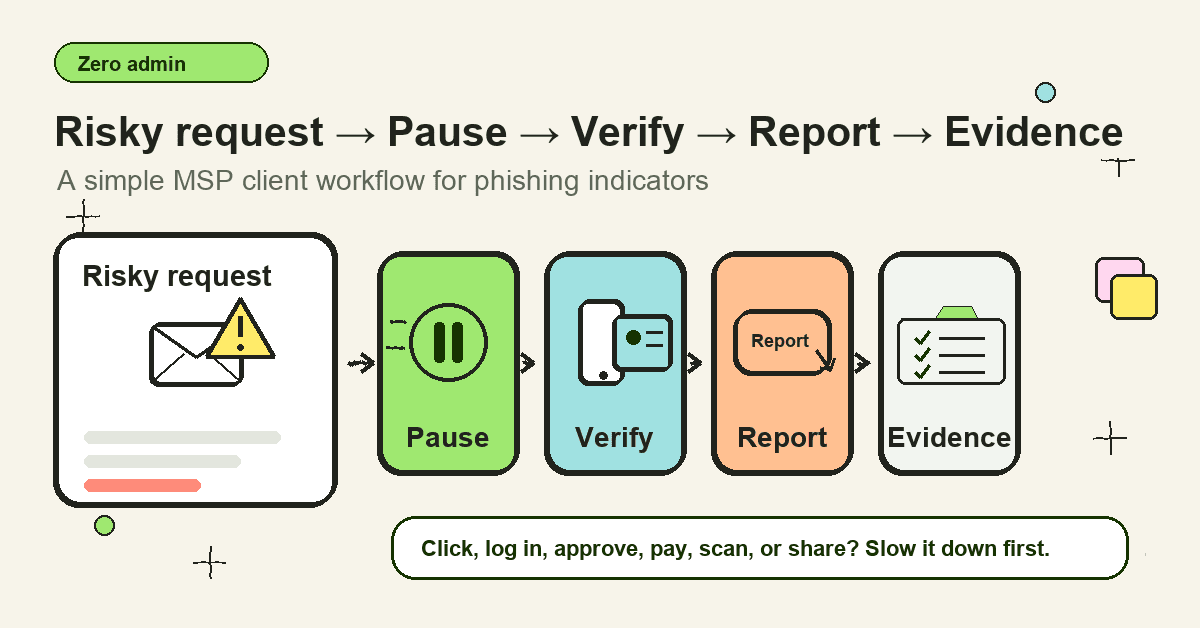
For MSPs, the training job is to turn that answer into a workflow. Users should learn to pause on risky requests, inspect the sender and link, verify through a known channel, report the message, and say what happened if they clicked or entered credentials. The MSP then needs tenant-level evidence that the topic was covered, reports were handled, and follow-up happened.
What is a phishing attempt?
A phishing attempt is a message, call, website, QR code, or prompt designed to trick a person into doing something unsafe. The unsafe action might be entering a password, approving an MFA prompt, opening a file, scanning a QR code, changing bank details, buying gift cards, or sending sensitive information.
The CISA, NSA, FBI, and MS-ISAC phishing guidance describes phishing as social engineering that tricks people into visiting malicious sites, revealing credentials, or interacting with malicious links and attachments. The FTC makes the same practical point for consumers: phishing emails and texts try to steal passwords, account numbers, Social Security numbers, or other sensitive information.
That definition matters for MSPs because phishing is not only an email problem. It can become an identity problem, payment problem, endpoint problem, client reporting problem, or insurance evidence problem.
A client user does not need to name every subtype before they can act safely. They need to recognise the risky moment.
Which is a common indicator of a phishing attempt?
A common indicator of a phishing attempt is an urgent request that asks the recipient to click, open, log in, approve, pay, reply, scan, or share information before they have time to verify the source.
That one pattern explains many obvious and less obvious examples:
- “Your account will be closed today. Click here to verify.”
- “Open the protected invoice and sign in to view it.”
- “I’m in a meeting. Buy gift cards and send me the codes.”
- “Scan this QR code to complete payroll setup.”
- “Approve this MFA prompt so IT can finish the update.”
- “We changed bank details. Use the new account for this invoice.”
- “Your document has expired. Sign in again.”
Microsoft’s phishing guidance lists urgent calls to action or threats as a common warning sign. Google’s Gmail guidance also warns about urgent-sounding messages and requests for private information. Cyber.gov.au notes that phishing can ask users for banking logins, credit card details, passwords, QR-code account linking, registration PINs, or verification codes.
The clue is not just “this email looks bad.” A polished message can still be malicious. The better question is: does this request pressure the user into a risky action through a channel the attacker controls?
Common phishing indicators employees should know
Most phishing training lists several warning signs. That is useful, but only if the signs map to a decision the user can make.
| Indicator | What the user sees | Why it matters | Safer action |
|---|---|---|---|
| Urgency or threat | “Act now,” “final notice,” “account locked,” “payment overdue” | Pressure reduces checking | Pause and verify through a known channel |
| Mismatched sender | Display name looks right, email domain is odd or misspelled | The sender may be impersonated or spoofed | Check the real address and report if suspicious |
| Unexpected link | Button or short link asks for sign-in, payment, or document access | The visible link can hide a fake destination | Navigate to the service directly instead |
| Attachment pressure | Invoice, voicemail, scan, or secure document arrives unexpectedly | Attachments can deliver malware or lead to credential capture | Confirm with the sender through another route |
| Credential or MFA request | Message asks for password, one-time code, QR code, or approval | Attackers want reusable access | Never share codes or approve unexpected prompts |
| Payment or payroll change | Supplier, executive, or employee asks to change details | BEC often abuses normal business process | Use the client’s out-of-band verification rule |
| Generic or odd wording | Greeting, tone, role, or request feels off | It may be a mass phish, translation, or impersonation | Report rather than argue with the message |
| Platform warning | Outlook, Gmail, or browser shows unverified sender or unsafe-link warning | Built-in controls have detected risk | Do not bypass the warning without IT review |
Bad spelling still belongs on the list. So do generic greetings and strange formatting. But training that stops there is weak. Many phishing messages now use clean copy, copied branding, real vendors, compromised accounts, cloud-sharing pages, and current events.
Users need to understand the action being requested.
Why this matters for MSPs
Phishing creates work for MSPs after the user’s decision. A reported suspicious email can be handled quickly. A deleted message may leave the MSP blind. A credential entry can trigger password resets, session revocation, sign-in log review, mailbox-rule checks, and client communication. A payment request can become business email compromise.
The public data supports treating phishing as a normal client risk, not a rare event. The FBI IC3 2024 Annual Report listed phishing/spoofing as the top crime type by complaint count, with 193,407 complaints, and reported $2.77 billion in business email compromise losses. The APWG Q1 2025 trends report recorded 1,003,924 phishing attacks in the quarter across its reporting channels and member network. The Verizon 2025 DBIR reported phishing at about 15% of known initial-access vectors in non-error, non-misuse breaches, with credential abuse still a major path.
Those figures do not predict a specific client’s risk. They do show why MSPs should make phishing indicators a repeatable training and response workflow.
For an MSP, the practical question is not only “did users finish a phishing module?” It is:
- Do users know the few indicators that require a pause?
- Do they know where to report?
- Does the MSP receive enough detail to triage?
- Can the MSP show which client users were trained?
- Can the MSP turn reports and mistakes into follow-up coaching?
That is the difference between awareness content and managed service delivery.
What MSPs should teach first
Start with the indicators that produce the most downstream risk.
1. Urgency attached to an unsafe action
Urgency is not automatically malicious. Real businesses have deadlines. The warning sign is urgency plus a request to bypass the normal path.
Examples include urgent requests to change bank details, approve access, open a file, sign in from a link, scan a QR code, or keep the request secret. This is where employees should be trained to slow down, even if the request appears to come from a manager, vendor, client, or platform.
A good user rule is short: if the request moves money, changes access, exposes data, or bypasses approval, verify outside the message.
2. Sender details that do not match the story
Attackers can make the display name look familiar. Users should learn to check the real address and domain when the request is sensitive.
Microsoft’s Outlook guidance explains that Outlook may show unverified sender indicators, sender mismatch details, or “via” tags when the visible sender does not line up with the authenticated sender. Those signals are not perfect proof of phishing, but they are reasons to stop and report.
For client training, keep the rule practical. Users do not need a lecture on SPF, DKIM, and DMARC. They need to know that “Jess from payroll” sent from an unfamiliar domain is not enough to act on a payroll request.
3. Links that control the login journey
A message-driven login is one of the most common dangerous moments. The user receives a document, invoice, password expiry notice, tax notice, shipping update, or shared folder link. The message sends them to a page that asks for credentials.
Teach users to avoid signing in from surprise links. If the service might be real, open the app through the known bookmark, app launcher, password manager, or official site. The link should not control the route to the login page.
This is especially important for Microsoft 365, Google Workspace, payroll, banking, VPN, file-sharing, and remote-access services.
4. Attachments that create pressure
Unexpected attachments still matter. They might be malware, or they might be a “protected document” that asks the user to sign in.
The indicator is not only the file type. It is the context. Was the file expected? Does the sender normally send files this way? Does opening it require a login, macro, password, or viewer the user does not normally use?
When the answer is unclear, users should report the message or verify through a known channel before opening.
5. QR codes, texts, and voice calls that move the user out of the normal workflow
Phishing does not stay inside email. CISA’s joint guide notes the use of SMS, collaboration tools, messaging platforms, and voice. APWG’s Q1 2025 report highlighted QR-code phishing growth, including large volumes of malicious QR codes detected by contributors.
For MSP clients, this creates a training gap. A user may be careful on a desktop email but less careful on a phone. A QR code moves the decision to a smaller screen. A voice call adds pressure. A Teams message feels internal.
The operating rule stays the same: if the request creates risk, verify outside the channel that delivered it.
Step-by-step: how to handle a phishing indicator
1. Pause before interacting
The first win is speed control. The user should stop before clicking, replying, scanning, opening, approving, or forwarding.
This is not about fear. It is about creating a few seconds to check the request.
2. Check the business action
Ask what the message wants the user to do. If it asks for a password, MFA code, payment, gift card, payroll update, bank-detail change, file download, remote-access session, or sensitive data, treat it as high risk until verified.
This works better than asking users to memorise every phishing style.
3. Inspect the sender, link, and context
Check the real sender address, not only the display name. Hover or long-press to inspect links without clicking where the platform allows. Look for unexpected domains, shortened links, odd routing, unusual attachments, or platform warnings.
But do not over-train users to investigate forever. If the request is risky and unclear, report it.
4. Verify through a known channel
If the request might be legitimate, verify from a source the attacker did not provide. Use a saved vendor number, known client contact, existing ticket, internal directory, payroll portal, bank portal, or approved manager path.
Do not reply to the suspicious email to verify it. Do not call the number in the message. Do not use a link from the message to “check.”
5. Report the message
Reporting helps the MSP protect the rest of the tenant. The NCSC encourages reporting scam emails, texts, websites, adverts, and calls. The FTC also advises reporting phishing and deleting suspicious messages after taking the proper steps.
For MSP-managed clients, the reporting route should be simple: Outlook report button, Gmail reporting, a security mailbox, service desk ticket, or a defined client-specific path. One path is better than five half-remembered options.
6. Say what happened if there was interaction
If the user clicked, opened, scanned, entered credentials, approved MFA, replied, or sent money, they should say so clearly. That changes the response.
The MSP needs a no-blame intake script. Users who fear punishment may wait. Waiting gives attackers time.
What good looks like for MSP client training
A good phishing-indicator program is specific, repetitive, and easy to prove.
| Program element | Weak version | Better version |
|---|---|---|
| Lesson focus | “Look for bad spelling” | “Pause on risky requests: login, money, files, MFA, data, urgency” |
| Reporting | “Tell IT if worried” | One visible reporting path, tested during onboarding and refreshers |
| Role depth | Same module for everyone | Extra scenarios for finance, payroll, executives, helpdesk, and admins |
| Response | User forwards screenshots to a manager | MSP receives original report, triages, searches tenant, documents action |
| Evidence | Completion screenshot | Tenant-level topic, assignment, completion, overdue users, incidents, follow-up |
| Client review | “Training was done” | QBR note showing coverage, reports, trends, and next training action |
This connects directly to other client-facing workflows: phishing prevention lessons, credential phishing, Outlook phish alert button, security awareness topics, and measuring security awareness effectiveness.
Mistakes to avoid
Mistake 1: Teaching a single “gotcha” indicator
Users often search this keyword because they expect one quiz answer. That is fine for a basic awareness question, but it is too thin for client operations.
Urgency is common. Bad grammar is common. Suspicious links are common. Mismatched domains are common. The useful lesson is how those indicators connect to a risky action.
Mistake 2: Treating clean writing as safe
Modern phishing can be well written. AI-assisted copy, copied templates, compromised accounts, and real business context can remove many old clues.
Keep spelling and grammar in training, but do not make them the main test.
Mistake 3: Training users to forward suspicious emails casually
Forwarding a suspicious email around the company can spread the risk, strip useful headers, or create confusion. The client should have a defined reporting path.
If the MSP wants users to forward to a mailbox, make that the official route. If the client uses a report button, train it. If reports create tickets, show users what happens next.
Mistake 4: Ignoring payment and payroll process
Some phishing attempts do not ask for passwords. They ask for money, supplier bank changes, payroll changes, gift cards, W-2 information, or sensitive client records.
General awareness training should be paired with finance and leadership verification rules. Otherwise the highest-risk requests are left to informal judgement.
Mistake 5: Forgetting evidence
Clients need proof, not vibes. MSPs should be able to show the phishing-indicator topic was assigned, who completed it, who is overdue, what reporting path was communicated, and what follow-up happened after reports or simulations.
Evidence does not prove phishing is solved. It proves the MSP ran the process.
How a flat-rate MSP SAT platform helps
A phishing-indicator lesson is useful only if it reaches the client users who need it. That is where per-seat pricing can create the wrong incentive: every extra user can feel like another cost decision.
DefendWise is built for MSPs as a flat-rate, white-label, multi-tenant security awareness training platform. MSPs can cover unlimited users across client organisations, keep the training under their brand, and report topic coverage without turning every new phishing refresher into another seat-count conversation.
The soft CTA is simple: if you want phishing-awareness training that is easier to roll out across the whole client base, start a free 7-day trial or review how DefendWise supports MSP security awareness training, white-label delivery, and multi-tenant SAT.
Frequently asked questions
Which is a common indicator of a phishing attempt?
A common indicator is urgency tied to a risky action. If a message pressures someone to click a link, open an attachment, enter credentials, approve MFA, share sensitive information, or change payment details before verifying, treat it as suspicious.
What are the most common phishing warning signs?
Common warning signs include urgent threats, mismatched sender domains, unexpected links, unexpected attachments, requests for passwords or MFA codes, generic greetings, payment-change requests, QR codes, and messages that bypass normal approval processes.
Is an unfamiliar sender always phishing?
No. A first-time sender is not automatically malicious. It is a reason to inspect the request carefully, especially when the message asks the user to take a risky action.
Are spelling mistakes still a phishing indicator?
Yes, spelling mistakes and odd grammar can be indicators. They are not reliable enough by themselves because many phishing messages are now polished, branded, and context-aware.
What should a user do after clicking a phishing link?
They should stop interacting, report through the approved path, and say what happened. If they entered credentials or approved MFA, the MSP or IT team should treat it as a priority identity incident.
How can MSPs prove they trained users on phishing indicators?
MSPs should keep tenant-level evidence: topic assigned, users covered, completion dates, overdue users, role-based scenarios, reporting instructions, report volume, and follow-up coaching or remediation.
Should MSPs run phishing simulations?
Phishing simulations can help when they teach the right behaviour and are not used to shame users. Track reporting rate, report speed, repeat risky actions, and role relevance, not only click rate.
How does DefendWise fit this workflow?
DefendWise helps MSPs deliver white-label, multi-tenant awareness training on a flat monthly fee. That makes it easier to cover all client users, keep phishing topics current, and report training coverage without per-seat pricing pressure.
Sources
- CISA, NSA, FBI, and MS-ISAC, Phishing Guidance: Stopping the Attack Cycle at Phase One
- FTC, How To Recognize and Avoid Phishing Scams
- Microsoft, Protect yourself from phishing
- Microsoft, Phishing and suspicious behavior in Outlook
- Google, Avoid and report phishing emails
- NCSC, Phishing: Spot and report scam emails, texts, websites and calls
- ACSC / Cyber.gov.au, Phishing
- APWG, Phishing Activity Trends Report, Q1 2025
- FBI IC3, 2024 Internet Crime Report
- Verizon, 2025 Data Breach Investigations Report
- FBI, Business Email Compromise
- NIST, Phishing Resistance: Protecting the Keys to Your Kingdom